Posts

How to Create Custom DialogBox using JQuery
Image
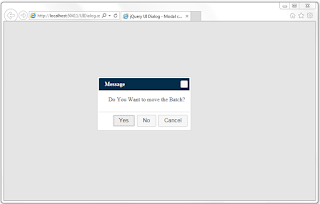
Example: In this application I will show you how to create Dialog box using  JQuery . Mostly we use JavaScript Default confirmation box for yes or no options.But we can't add another option into that Default Confirmation box in that requirement we want to create custom Dialog box. For my requirement I need three button Yes,No and Cancel Options in Dialog Box. Lets see how it possible with JQuery 1. Create a new webform with the name of 'UIDialog.aspx'. 2. Add a JQuery and Css plugins for custom Dialog Box below head tag. Please see in code. 3. Create a function in that I have three buttons in aspx page. Please see below code. <head runat="server">     <meta name="viewport" content="width=device-width, initial-scale=1">     <title>jQuery UI Dialog - Modal confirmation</title>     <link href="Css/styles.css" rel="stylesheet" type="text/css" />     <script type=...
Restrict Special Characters in Windows Application using c#

Image
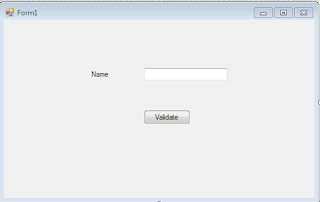
Example : In this application it will remove all the special characters when we trying to copy paste the special characters. Lets see how it is possible with Copy,paste. Please follow these steps : 1. Create a New Windows Form with the name of 'Form1', and take one label with the name of 'lblName' and one textbox with the name of 'txtName' and one button with the name of 'btnValidate'. Please see below image. 2. Add a code in TextChanged event for that textbox. Here my textbox name is 'txtName' in that I have added a event like . private void txtName_TextChanged(object sender, EventArgs e) {       txtName.Text = RemoveSpecialCharacters(txtName.Text); } 3. In that event you observed method name of 'RemoveSpecialCharacters'.Basically it will remove all the special characters when you are copy paste in to the textbox.       private string RemoveSpecialCharacters(String inString)       ...

Allow Numbers After Decimal And Before In Jquery

Image
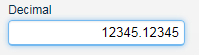
Example: In this function it will takes 10 digits before decimal and after decimal it will takes 8 digits. Lets see how it is possible in Javascript, if you want to change it in Jquery also Please follow these steps: 1. Create a textbox with the name of txtDecimal and add a event with the name of onkeypress to that textbox and give maxlength of that textbox. See below. <asp:TextBox ID="txtDecimal" runat="server" MaxLength="20" onkeypress="return CheckNumber(event,this.value)"></asp:TextBox> 2. Create a Javascript function with the name of CheckNumber in aspx page. <script type="text/javascript">         function CheckNumber(key, value) {             var dot= /[.]/g;             var whitespace = /^\S+$/;             var Minus = /[-]/g;   ...

Restrict Special Characters Using JavaScript By Copy,Paste

Restrict Special Characters using copy,paste events in JavaScript. Please follow these steps: 1. Create a textbox with the name of txtValidation and add event by the name of onpaste to that textbox. <asp:TextBox ID="txtValidation" runat="server" onpaste="return Validate(this.value);"></asp:TextBox> 2. Create a Function to that event.  <script type="text/javascript">         function Validate(Value) {             var pastedData = window.clipboardData.getData('Text');             var reg = /^[a-zA-Z0-9 ]*$/             if (!reg.test(pastedData)) {                 alert('Not Accept Special Characters');                 return false;             }         }     </script> Some of the spec...