Posts

Showing posts with the label Angular Tutorial

Use immutable data structures to avoid unnecessary change detection In Angular

In Angular, change detection is triggered whenever there is a change in the component's data or state. This can be a performance bottleneck if the component's data is updated frequently, and the component has a lot of child components or bindings. One way to optimize change detection is to use immutable data structures. Immutable data structures are data structures that cannot be modified once they are created. Instead, when a change is made to the data, a new instance of the data structure is created with the updated values. Here's an example of how to use immutable data structures in Angular: HTML import { Component } from '@angular/core'; import { List } from 'immutable'; @Component({ selector: 'app-list', template: ` {{ item }} ` }) export class ListComponent { items = List (['item 1', 'item 2', 'item 3']); addItem() { // The...

Angular Code Optimization Techniques and Methods

Angular code optimization refers to the process of improving the performance of an Angular application by reducing the amount of time it takes to load and run the application. This includes reducing the size of the code, minimizing the number of requests to the server, and improving the rendering speed of the application. Code optimization techniques for Angular can include strategies such as using lazy loading, AOT (Ahead-of-Time) compilation, using OnPush change detection strategy, and optimizing the use of pipes, observables, and other directives. The goal of code optimization is to create a faster, more efficient application that provides a better user experience for the end-users. By optimizing the code, the application can load faster, run smoother, and use less resources, which can improve its overall performance and user satisfaction. Here are some tips to optimize Angular code: Use OnPush Change Detection Strategy : This strategy only checks for changes when the @Input propert...

Create Extension Method in typescript - String.IsNullOrEmpty()

Image
How to Create Extension Method using Typescript in Angular Application - String.IsNullOrEmpty() Step 1 : Create typings.d.ts (declaration file) in the application and declare the method in interface like below. HTML interface StringConstructor { isNullOrEmpty(value: string): boolean; } Step 2 : Create extension.ts file in the application and implement the method like below. HTML String.isNullOrEmpty = function (value: string): boolean { return value === undefined || value.trim() === '' || value === null; }; Step 3 : Usage of the Method in the component or class file. HTML import './extensions'; export class TestComponent implements OnInit { public ngOnInit(): void { let abc; console.log(String.isNullOrEmpty(abc)); } } Step 4 : Output like below.

Recommended Visual Studio Code Extensions for Angular Development

Every Angular Developer should know these recommended VS Code Extensions. I guess most of the developers using the Visual Studio Code tool for coding. There are large number of extensions are available in market place. But I choose necessary extensions, which is related to angular development. It will speed up your work when you're doing development. Extensions can help to improve productivity and code quality for Angular development in VS Code. By automating tasks and enforcing best practices, these extensions can help developers to create better code more quickly and with fewer errors. Angular Language Service - Provides rich editing experience for Angular templates with autocompletion, diagnostics, and jump-to-definition features. Angular Snippets - Provides a collection of Angular snippets to quickly insert common code structures, such as components, directives, and services. Angular Console - Provides a GUI tool for generating and managing Angular projects and associated fi...

Eager Loading, Lazy Loading Strategies In Angular

Image
Angular has provided 3 types of module loading strategies. Every module loading strategy has its own way of implementation. In this post, we will know about what is the basic definition and benefits of every loading strategy.  Why we use loading strategy ? It is necessary to load the feature modules or components that are required to render an application. Based on our requirements, We need to know which loading strategies will suitable to our application. 1. Eager Loading  2. Lazy Loading 3. Pre Loading Eager Loading : It is the default loading strategy to load the components in angular application. It is useful in small size applications.  In Eager Loading all the components will be loaded before the application starts . It makes subsequent request to the application will be very faster. In Eager loading, all the components will import in app.module.ts. Lazy Loading : It loads only the required feature modules to render the page in application. In Lazy l...

Export to Excel in Angular 6 | 7 | 8 | 9 | 10

Image
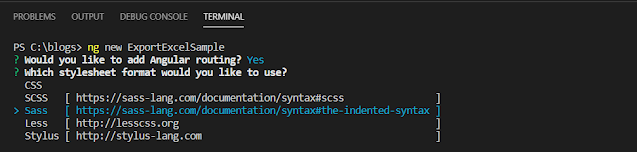
How to export the data in excel in Angular In Angular, we have different types libraries to export the data into excel file in different formats like (.xlsx, .xls, .csv). No need to communicate the server to export the data in excel file. Here we need to know about two famous angular libraries to export the data in excel file.  1. xlsx is a library to generate excel file in different formats with graphical design. Click here xslx ✋  to know more information about this library. 2. file-saver is a library to save the files in client side.  Click here file-saver ✋  to know more information about this library.  The main advantage of using this approach is, it will improve the performance to your application. In this post, We can see how to implement the export to excel functionality using xlsx library in Angular. Step 1 :   To create new application using angular cli, open Visual Studio code tool and open the terminal...

Angular CLI Commands - Cheat Sheet

Image
Angular CLI (Command Line Interface) is one of the powerful tool that allows you to perform a lot of actions in an Angular project by using simple commands. We can use the CLI tool directly in a command shell, or indirectly through an interactive UI such as Angular Console.  The Best Advantage is that, can avoid manual process to create lot of stuff like create components, directives, feature modules, services... etc.  It automatically recompiles the source code files and refreshes the app in the browser.  Let's see, how to install CLI tool and what are those CLI commands. Installing the CLI is very quite easy. All we need to do, is to run the below command in Terminal or Console. It will install the CLI tool globally with respective version. Here we need to know two things before installing the CLI tool. We can install latest version or any version released by angular team based on your project need. Check the Versions list.✋ Angular CLI Setup  1. Globally - To ins...

Naming Conventions

Image
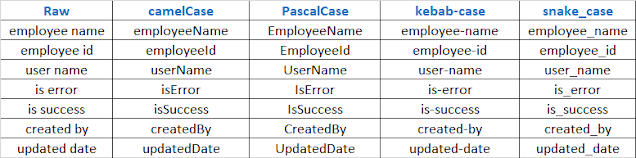
Naming Conventions is very important for any application for better readability of  code. What is Naming Convention ?  Naming conventions are general rules applied when creating text scripts for software programming. They have many different purposes, such as adding clarity and uniformity to scripts, readability for third-party applications, and functionality in certain languages and applications. They range from capitalization and punctuation to adding symbols and identifiers to signify certain functions. Advantages of Naming Conventions are : 1. Consistency 2. Better understanding the code 3. Readability 4. Automation Types of Naming Conventions:  1. camelCase : First letter should be lower case. 2. PascalCase :   All words should be upper case. 3. kebab-case : Use dash symbol between word to word with lower case. 4. snake_case : Use underscore symbol between word to word with lower case. How and where these naming conventions will use ? Please check this pos...

Angular Coding Styles and Standards - PART 1

Image
Coding Styles is very important to every application. It tells how the application is clean and neat.  Every programming language has common coding styles and standards. We must follow the few of the coding styles it will very helpful to application development. Then the code will easier to understand. In this post, listed few of the angular coding styles and standards with small examples. 1. Per file, the code should limit to 400 lines. import  {  Component  }  from   '@angular/core' ; @ Component ({    selector :   'app-root' ,    templateUrl :   './app.component.html' ,    styleUrls :  [ './app.component.scss' ] }) export   class   AppComponent  {    // Per file, the code should limit to 400 lines. } 2.  Per function, the code should limit to 75 lines. public   displayUserInformationToTable ():  void  {   //...

Create Custom Form Control for ng-select in Angular

Image
How to Create Custom Form Control in Angular  Why we create custom form control ? Normally, we used to create custom form control for re-usability.  The best advantage is that to add common functionality and features in this custom form control and extend the functionality as per our need and requirement.  And we can use everywhere into the application. But this example will tell you how to create custom form control to extend the functionality of  angular ng-select component.  We are adding a feature for this control, multi selection along with checkbox. Before that, we need to know what is the basic syntax of creating custom form control in angular. So, we start by implementing the ControlValueAccessor interface from @angular/forms into the component. This interface has three functions that need to be implemented and one optional functional. writeValue(obj: any): void { } registerOnChange(fn: any): void ...

How To Setup Angular 10 Environment On Windows

If you are new to angular, Please follow below steps to setup angular 10 in your windows environment.  Download and Install node.js in your windows environment. Download Node JS   We need code editor tool to create and run the angular projects. We have best tools to choose from online.  Visual Studio Code is Open Source Tool, Download and Install VSCode . WebStorm is Premium Tool, To Download and Install WebStorm Tool   Once you have install above tools. We need to install Angular CLI latest version. To Install the Angular CLI in your windows environment. We have two ways to install. globally - npm install -g @angular/cli@latest  In upcoming posts I will explain you two types: a) globally   b) locally.  Now Angular Setup is ready in your windows environment, so you can create the projects and libraries.